

Artificial Intelligence (AI) is no longer a futuristic concept. Today, AI tools are helping students learn faster, professionals work smarter, and businesses increase productivity. From writing assignments and creating presentations to managing projects and analyzing data, the best AI tools can save time and improve efficiency.
In this article, we will explore the best AI tools for students and professionals in 2026 and how they can help you achieve better results in your academic and professional life.
Table of Contents
Why AI Tools Are Important
AI-powered applications automate repetitive tasks, provide intelligent suggestions, and help users make informed decisions. Whether you are a student preparing for exams or a professional handling multiple projects, AI tools can simplify your work.
ADVERTISEMENT
Some key benefits of using AI tools include:
- Increased productivity
- Better time management
- Improved learning experience
- Enhanced creativity
- Faster research and analysis
- Reduced manual effort
Let’s look at some of the best AI tools available today.
1. ChatGPT
ChatGPT is one of the most popular AI tools for students and professionals. It can answer questions, generate content, summarize articles, explain complex topics, and assist with coding.
Benefits:
- Helps students understand difficult subjects
- Generates ideas for assignments and projects
- Assists professionals in drafting emails and reports
- Supports multiple languages
Students can use ChatGPT for learning, while professionals can use it for productivity and communication tasks.
2. Grammarly
Grammarly is an AI-powered writing assistant that helps improve grammar, spelling, punctuation, and writing style.
Benefits:
- Detects grammatical mistakes
- Suggests better sentence structures
- Improves readability
- Helps create professional documents
Whether you are writing an essay, blog post, or business proposal, Grammarly can significantly enhance your writing quality.
ADVERTISEMENT
3. Notion AI
Notion AI combines note-taking and AI assistance in one platform. It helps users organize information and generate content quickly.
Benefits:
- Creates summaries of notes
- Generates content ideas
- Organizes study materials
- Helps manage projects
Students can keep all their study notes in one place, while professionals can manage workflows efficiently.
4. Canva AI
Canva AI makes graphic design easier for everyone. Even without design experience, users can create professional-quality visuals.
Benefits:
- Generates presentations quickly
- Creates social media graphics
- Designs posters and infographics
- Saves time with AI-powered templates
Students can create attractive presentations, and professionals can design marketing materials effortlessly.
ADVERTISEMENT
5. Google Gemini
Google Gemini is a powerful AI assistant that helps with research, content generation, and productivity tasks.
Benefits:
- Provides detailed answers
- Assists in research projects
- Generates content ideas
- Integrates with Google services
It is especially useful for students conducting research and professionals handling information-intensive tasks.
6. Microsoft Copilot
Microsoft Copilot integrates with Microsoft Office applications such as Word, Excel, and PowerPoint.
Benefits:
- Automates document creation
- Generates presentations
- Analyzes spreadsheet data
- Improves workplace productivity
Professionals who regularly use Microsoft Office can benefit greatly from Copilot’s AI-powered features.
7. QuillBot
QuillBot is an AI writing tool known for paraphrasing and rewriting content.
Benefits:
- Rewrites sentences clearly
- Improves academic writing
- Helps avoid plagiarism
- Enhances readability
Students often use QuillBot to improve essays and assignments, while professionals use it for content refinement.
8. Otter.ai
Otter.ai converts spoken conversations into written text automatically.
Benefits:
- Records lectures and meetings
- Creates accurate transcripts
- Saves note-taking time
- Improves productivity
Students can use it to capture lecture notes, and professionals can document meetings efficiently.
9. Perplexity AI
Perplexity AI is an AI-powered search and research assistant.
Benefits:
- Provides source-based answers
- Speeds up research
- Offers reliable information
- Simplifies complex topics
It is an excellent tool for students working on research papers and professionals seeking quick insights.
10. Midjourney
Midjourney is a leading AI image-generation platform.
Also Read: Cyber Safety for Students
Benefits:
- Creates high-quality images
- Generates unique artwork
- Helps with creative projects
- Supports marketing and branding
Professionals in design and marketing can use Midjourney to create impressive visual content.
How to Choose the Best AI Tools
When selecting the best AI tools, consider the following factors:
Purpose
Identify whether you need help with writing, design, research, coding, or productivity.
Ease of Use
Choose tools with user-friendly interfaces.
Pricing
Many AI tools offer free versions. Compare features before purchasing premium plans.
Accuracy
Select tools known for reliable and accurate outputs.
Integration
Look for tools that integrate with software you already use.
Final Thoughts
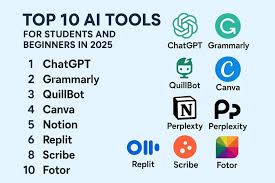
AI technology is transforming education and workplaces around the world. The best AI tools help students learn more effectively and enable professionals to work faster and smarter. Tools like ChatGPT, Grammarly, Notion AI, Canva AI, Google Gemini, Microsoft Copilot, QuillBot, Otter.ai, Perplexity AI, and Midjourney offer powerful features that can improve productivity and creativity.
As AI continues to evolve, adopting the right tools can provide a significant advantage in both academic and professional environments. Start exploring these AI tools today and discover how they can help you achieve your goals more efficiently.
FAQs About Best AI Tools (300 Words)
1. What are the best AI tools for students?
Some of the best AI tools for students include ChatGPT, Grammarly, Notion AI, QuillBot, and Perplexity AI. These tools help with research, writing, note-taking, and learning complex subjects more effectively.
2. Which AI tool is best for writing assignments?
ChatGPT and Grammarly are among the best AI tools for writing assignments. ChatGPT helps generate ideas and content, while Grammarly improves grammar, clarity, and readability.
3. Are AI tools free to use?
Many AI tools offer free plans with basic features. However, premium subscriptions often provide advanced functionality, higher usage limits, and better performance.
4. Can professionals benefit from AI tools?
Yes. Professionals use AI tools for content creation, data analysis, project management, meeting transcription, and communication. These tools save time and improve productivity.
5. What is the best AI tool for creating presentations?
Canva AI and Microsoft Copilot are excellent options for creating presentations. They help generate slides, design layouts, and improve overall presentation quality.
6. Is it safe to use AI tools?
Most reputable AI tools follow security and privacy standards. However, users should avoid sharing sensitive personal or business information unless they understand the platform’s privacy policies.
7. Which AI tool is best for research?
Perplexity AI and Google Gemini are highly effective research tools. They provide quick access to information, summarize content, and help users find reliable sources.
8. How do I choose the best AI tools?
Choose AI tools based on your needs, budget, ease of use, and required features. Testing free versions can help determine which tool works best for your specific goals.
Disclaimer
All news on Hindi Khabra are computer generated and provided by third party sources, so read and verify carefully. Hindi Khabra will not be responsible for any issues.